
A desk mouse and a trackball look like the same product with one part moved. Pick either up and the difference turns out to be the whole operating idea: one travels across the desk, and the other sits still while your thumb does the moving. Put as trackball mouse vs regular mouse, the question is usually settled on feel in a shop aisle. The brand’s own product page settles more of it than people expect, and in one place it contradicts itself.
This is an independent editorial review. Logitech did not review or approve this article.
Every figure below is read from the brand’s Mexican storefront on 17 November 2026, where the listing is published in Spanish and is paraphrased here. Nothing in this article is advice about injury, posture or hand health, and no price is quoted.
Reading trackball mouse vs regular mouse in one table
| What you are comparing | A thumb trackball | A regular desk mouse |
| What moves | The ball only; the body stays put | The whole device, across a surface |
| Desk space needed | Its own footprint and nothing more | Room to slide it and pick it up again |
| Surface it needs | Any, since it does not track the desk | One the sensor can read |
| Handedness | This model is right-handed only | Symmetrical shapes are common |
| Routine cleaning | The ball lifts out from underneath | Wipe the feet and the sensor window |
| Pointer speed spec | 400 DPI nominal, up to 2000 dpi | Usually quoted far higher |
The button count appears twice on one page, and the two numbers differ
The technical specifications block on the ERGO M575S listing is unambiguous. It carries two separate rows: number of buttons, which it gives as five, broken down as left and right click, back and forward, and the wheel with a middle click; and number of customizable buttons, which it gives as three, named as back, forward and the middle click.
Further down the same page, the questions block answers the question about programmable buttons by saying the mouse has five customizable buttons through the Logi Options+ software. Five is the total button count from the specifications table. Three is what that table says can be reassigned. The answer has taken one number and attached it to the other label.
It is not the only place the page says a thing twice. Two more pairs behave the same way, and the specifications table is the conservative half of each:
- Battery life is listed as up to 18 months in the specifications. The questions block says up to 18 months on the USB receiver and up to 20 months over Bluetooth.
- The feature copy states flatly that the contoured shape reduces forearm muscle tension by 25 percent. The questions block says up to 25 percent, and only there does it name what the comparison is against: standard mice.
- A third figure has its comparator printed plainly. Click noise is given as 80 percent lower, and the thing it is lower than is the earlier ERGO M575, which is the brand’s own previous model rather than a regular mouse.
What a trackball mouse vs regular mouse comparison can actually check
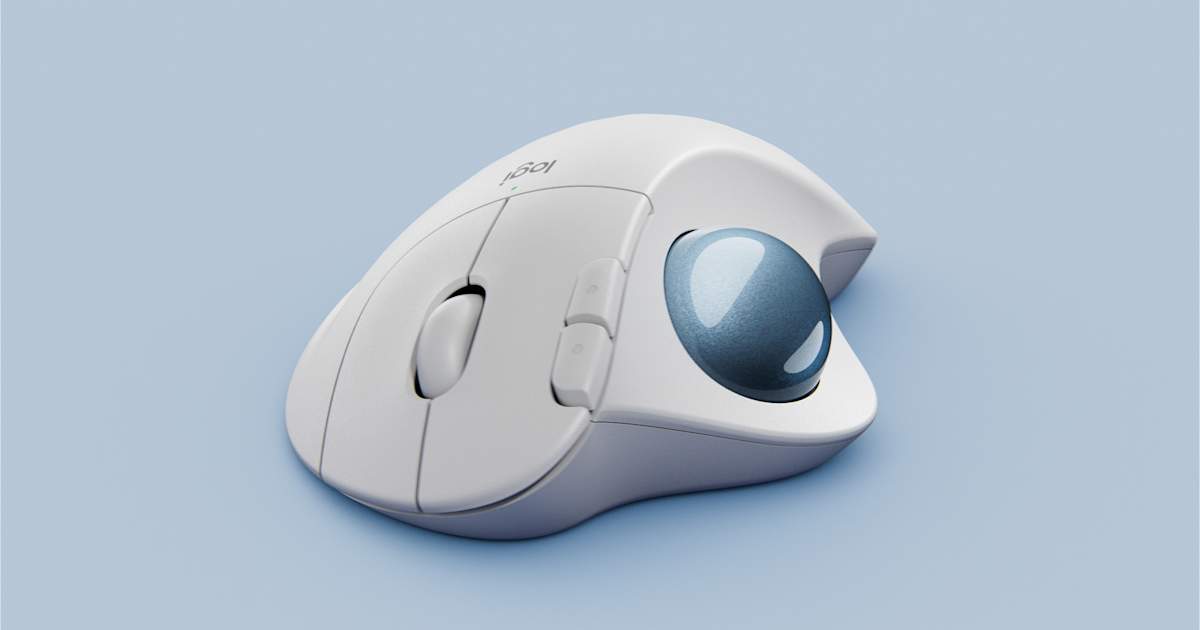
Most of what decides this purchase is published, and a useful trackball mouse vs regular mouse comparison is mostly a matter of knowing which block of the page to read. The specifications table holds the numbers a buyer can act on. The questions block holds the mechanical facts that no specification row covers, and it is where the real answers live: that the device is stationary and navigated entirely with the thumb, that this model is built for right-handed users only, and that the ball comes out from the underside for cleaning.
The connection detail is the one that catches people out. The listing says the mouse pairs over Bluetooth Low Energy or the bundled Logi Bolt USB receiver, and that the receiver needs a USB-A port. It also says plainly that older Unifying receivers will not work with it, so a spare receiver in a drawer is not a substitute.
What the Logitech listing settles about this trackball
The hardware facts are easy to line up once you stop reading the marketing copy and start reading the table. The sensor is described as advanced optical tracking with a nominal 400 DPI and a maximum of up to 2000 dpi, which is far below what gaming mice advertise and is the honest reason a trackball feels different rather than faster. The body measures 134 mm high, 100 mm wide and 48 mm deep and weighs 145 g, which is heavier than most travel mice because none of that weight ever has to be pushed around. One AA battery is included, and the wireless range is given as 10 meters. Operating system support is listed as Windows 10 and 11 or later, macOS 12 or later, Linux and ChromeOS, with iPadOS 15 and Android 12 added when you connect over Bluetooth, and the product carries a Works With Chromebook certification. The full listing is on Logitech.
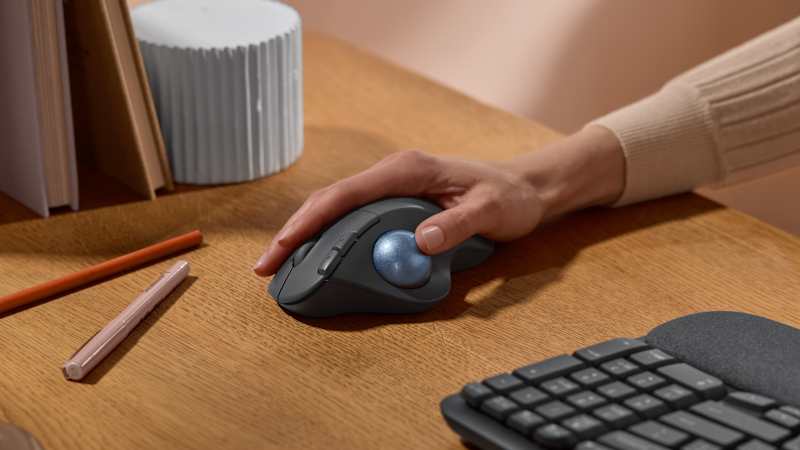
The feature copy adds the two claims that a specifications table cannot express: that the device works on any surface, because it is not reading the desk at all, and that it suits small or crowded workspaces for the same reason. Those are the claims worth testing against your own desk rather than against another product. Here is the order that settles it fastest:
- Check which hand you use, because this model is right-handed only and that ends the discussion for some buyers.
- Measure the space you actually have, since a stationary device needs its footprint and no clearance around it.
- Check your ports, because the bundled receiver needs USB-A and an older Unifying receiver will not pair.
- Decide how precise the pointing has to be, then read the 400 DPI nominal figure rather than the maximum.
- Read the specifications table before the questions block, and treat the table as the number of record.
Asking trackball mouse or regular mouse which is better gets a desk based answer
Framed as trackball mouse or regular mouse which is better, the question has no general answer, and the listing shows why. Every advantage the page claims for the trackball follows from one fact: the body does not move. That trade in trackball mouse vs regular mouse terms buys desk space, surface independence and a hand that stays supported. It also costs the thing a regular mouse gets for free, which is a large, fast pointing movement made with the whole arm.
So the honest version of the question is about the desk and the task rather than the device. If the surface is small, crowded or unsuitable, the stationary design is doing real work. If the job is dragging a cursor across two wide monitors all day, a device designed to minimize movement is solving a problem you do not have.
What a trackball mouse vs regular mouse review usually leaves out
A typical trackball mouse vs regular mouse review reports how the ball felt after a week and calls that the verdict. Three published details tend to go unmentioned. The first is the customizable button count, which is three and not five whatever the questions block says. The second is that the 25 percent tension figure is a comparative claim whose comparator appears in only one of the two places the number is printed. The third is the handedness line, which is a hard constraint rather than a preference and is stated once, quietly, in the questions block.
Cleaning is the other quiet half of the decision. A regular mouse collects dirt on its feet and sensor window, where you can see it. A trackball collects it in the socket under the ball, where you cannot, and the listing’s answer about lifting the ball out from the underside is the maintenance instruction for the life of the product. The Logitech page states it in one line and never returns to it.
Related guides
- Ergonomic Mouse vs Standard Mouse: What Logitech Lists
- Keyboard and Mouse Combo vs Separate Keyboard and Mouse
- Home Office Keyboard vs Laptop Keyboard: Logitech
Frequently Asked Questions
Four questions come up as soon as the two blocks on the page are read side by side.
Ques: How many buttons can I actually reassign?
The specifications table says three: back, forward and the middle click. It also says the mouse has five buttons in total, counting left and right click. The questions block says five are customizable, which appears to be the total repeated under the wrong label.
Ques: Does a trackball need a mousepad?
No. The listing says the device works on any surface, which follows from the design, since the sensor reads the ball rather than the desk underneath it. A regular mouse needs a surface its sensor can track.
Ques: Will my old wireless receiver work with it?
The page says no. It states that older Unifying receivers are not compatible and that the mouse needs the modern Logi Bolt receiver, which is included, or a native Bluetooth connection.
Ques: Is there a left-handed version of this model?
Not according to the listing. The questions block says the ERGO M575S is designed exclusively for right-handed users, which makes handedness the first thing to check rather than the last.
Bottom line
A trackball is not a regular mouse with the ball on top; it is a device that has given up moving in exchange for space, surface independence and a still hand. Read the specifications table rather than the questions block when the two disagree, check your handedness and your ports before anything else, and treat the 400 DPI nominal figure as the one that describes how it will feel.