

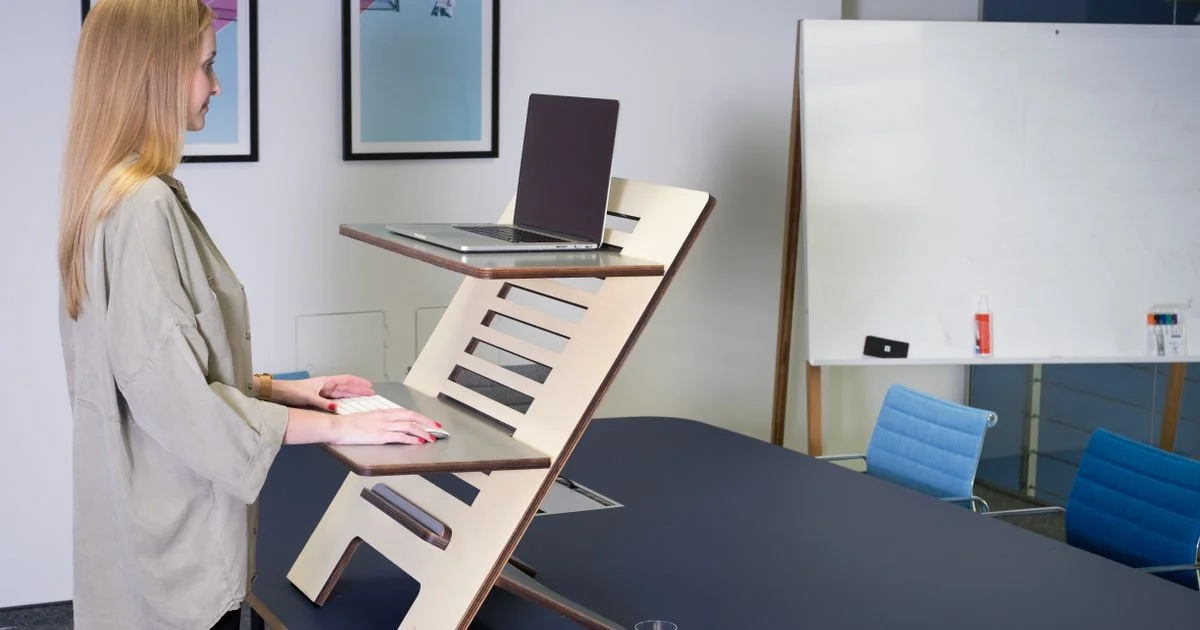
Converter listings lead with one number: how many inches the thing rises. That number is measured from your desktop, not from the floor, and it is not the height your hands end up at. Choosing the best standing desk converter comes down to three measurements the box rarely puts together for you.
Key Takeaways
- Quoted lift height is measured above your desk surface. Add your desk height to get the real number.
- The keyboard tray usually sits an inch or two below the top platform, so the tray height is what matters for your wrists.
- X-lift and Z-lift describe how the arms fold, not how stable the unit is. Build quality decides wobble.
- Weight capacity should comfortably exceed your load. A converter near its limit lifts unevenly and feels loose.
- Measure your desk depth before anything else. A deep converter base can swallow a shallow desk.
How to pick the best standing desk converter for your desk
The short answer: match the tray height to your elbows, the base depth to your desk, and the weight rating to your monitors — in that order. Everything else on the spec sheet is secondary. The best standing desk converter for a 5’4″ user with one laptop is a completely different machine from the right pick for a 6’2″ user running two 27-inch monitors, and neither of them is decided by the feature bullets.
Start by standing up straight and letting your arms hang, then bend your elbows to 90 degrees. Measure from the floor to your palms. That is your target keyboard height. Everything after this is arithmetic.
The height number on the box is not your standing height
This is where most converter regret comes from. A standard fixed-height desk sits at 29 inches, and most converters offer somewhere between 15 and 19 inches of total lift. So a 19-inch converter on a standard desk tops out around 48 inches — which sounds generous until you check what is actually at 48 inches.
It is the monitor platform. The keyboard tray hangs below it, typically by one to two inches, so your hands are working at 46 or 47 inches. For a user around 6’4″, whose neutral standing keyboard height lands near 46.6 inches, that is right at the edge. For anyone taller, or anyone whose desk is lower than 29 inches, the converter runs out of travel and you end up hunching.
The eye-level side of the problem is worse. If your standing eye level is above 60 inches from the floor, most converters cannot get a monitor high enough, and you spend the day looking down. A monitor arm clamped to the desk behind the converter is the usual fix, and it is worth budgeting for up front rather than discovering later.
Do the math before you shop
Take your desk height, add the converter’s quoted lift, subtract two inches for the tray drop. Compare that to your measured elbow height. If the result is within an inch, you are fine. If it is short by three or more, no amount of good reviews will fix it.
Adjustable desk riser mechanisms: X-lift versus Z-lift
Every adjustable desk riser uses one of two arm geometries, and manufacturers treat the letter as a selling point when it is really just a description of how the arms fold.
An X-lift uses crossed arms that scissor open. The surface travels almost straight up, with only a small forward-and-back shift as it rises. The trade-off is footprint: the base tends to be deeper and covers more of your desk. X-lifts generally carry more — roughly 35 to 45 pounds is typical — which makes them the sensible choice for dual monitors, heavy monitor arms, or taller users who need every inch of travel.
A Z-lift uses angled parallel arms. The surface swings through an arc, rising and moving toward or away from you at the same time. Z-lifts are usually more compact front to back, which is why they suit shallow desks, and they typically handle less weight — around 20 to 35 pounds. That is plenty for a laptop or a single monitor and marginal for anything more.
The stability myth
The letter does not predict wobble. Testing has repeatedly found well-built X-lifts steadier than nominally comparable Z-lifts at the same height and load, and the reverse is also true. What actually decides stability is base depth, column thickness, and how much metal is in the thing. A heavy converter feels planted; a light one does not, whatever shape its arms make.

Weight capacity, and why wobble shows up at full height
Capacity ratings are honest enough, but they are stated as a maximum, and a gas-spring converter behaves badly as it approaches that number. Loaded near the limit, the springs need more force to compress, the lift becomes uneven side to side, and the whole assembly develops play at the top of its travel — exactly where you notice it, because the higher the platform, the longer the lever arm between your typing hands and the desk below.
Add up what will actually sit on it. A 27-inch monitor, a monitor arm, a laptop, a keyboard, a mouse and a mug is easy to underestimate. Then leave a margin of at least a third. If your load is 25 pounds, shop for a 40-pound rating, not a 30.
- Gas spring: squeeze the handles and the platform rises. Fast, silent, no cord, but the assist is tuned for a weight range and feels wrong outside it.
- Electric: press a button. Handles heavy loads without complaint and holds any height precisely, but it costs more, adds a power cable, and is one more thing to fail.
- Manual crank or pin-and-hole: cheapest and most reliable, slowest to adjust. Slow adjustment is how people stop adjusting.
Converter tiers compared
Prices move constantly, so this compares what each tier gets you rather than what it costs on any given week.
| Tier | Typical build | Best for | Where it falls short |
|---|---|---|---|
| Entry | Z-lift, light frame, tray fixed to the platform, lower weight rating | A laptop or a single small monitor on a shallow desk | Noticeable wobble at full height; short travel; tray too small for a mouse |
| Mid | Gas-spring X-lift, separate keyboard tray, wider surface, mid weight rating | Most people — single or light dual monitor setups | Deep base eats desk space; capacity gets tight once a monitor arm is added |
| Upper | Heavy X-lift or electric column, wide deck, high weight rating, monitor-arm mounting point | Dual monitors, heavy arms, tall users needing full travel | Expensive, heavy, and often needs a deep desk to sit properly |
| Full sit-stand desk | Motorized legs, whole surface moves together | Anyone over about 6’2″, or anyone who never wants a height ceiling | Replaces the desk entirely; costs more; not renter-friendly to move |
Sit-stand desk comparison: converter or the real thing
The honest sit stand desk comparison is not about which is better. It is about whether you have a height ceiling problem. A converter keeps your existing desk, costs less, moves house easily, and can be undone in thirty seconds. A full sit-stand desk moves the entire work surface, so the keyboard-tray drop disappears and the height range extends far past what a converter can reach.
If your math above came out comfortably in range, a converter is the better buy and it is not close. If you came out short — because you are tall, because your desk is low, or because you want monitors at true eye level — a converter will disappoint you no matter how good it is, and the money is better spent on a desk. Our guide to ergonomic laptop stands covers the cheaper middle ground if you mostly work off a laptop.
Where a budget standing desk converter cuts corners
A budget standing desk converter saves money in predictable places, and knowing them makes the listings much easier to read. The keyboard tray is usually the first casualty — either it is missing entirely, so your keyboard sits at monitor height, or it is too narrow to hold a mouse beside the keyboard. The second is travel: cheaper units stop several inches short, which is fine if you are average height and useless if you are not. The third is the frame itself, where thinner steel and shallower bases produce the wobble that shows up in the reviews.
What to check before you buy
- Measure your desk height and your standing elbow height. Write both down.
- Check whether the listed height is lift above the desk or total height. Almost always the former.
- Find the keyboard tray drop — how far the tray sits below the top platform. Subtract it.
- Measure your desk depth and compare it to the converter’s base depth, not its surface width.
- Add up everything that will sit on top and confirm the weight rating exceeds it by a third.
- Confirm the tray is wide enough for keyboard and mouse together, not just the keyboard.
- If you plan to add a monitor arm, check the converter has a mounting edge that will accept a clamp.
Frequently Asked Questions
A few things come up over and over once people start comparing converters, and most of them are measurement questions in disguise.
Does an X-lift or Z-lift wobble less?
Neither, reliably. The arm geometry describes the motion path, not the rigidity. Judge stability by weight, base depth and column thickness, and read owner reports that specifically mention full standing height rather than general impressions.
Can I use a converter with a monitor arm?
Often yes, but check two things: the converter needs an edge thick and accessible enough for the clamp, and the arm plus monitor counts against the weight rating. A monitor arm on a converter is also the standard fix for the eye-level shortfall taller users run into.
How much desk depth do I need?
Enough for the converter’s base plus room in front of the keyboard tray for your wrists. Shallow desks around 24 inches deep struggle with deep-base X-lifts; a compact Z-lift is the safer choice there.
Is an electric converter worth the extra money?
It is if your load is heavy or varied, because gas springs are tuned for a weight band and feel wrong outside it. For a laptop and one monitor, a good gas-spring unit adjusts just as fast and has nothing to plug in.
The bottom line
A converter is a height problem wearing a product listing, and the arithmetic takes two minutes: desk height, plus quoted lift, minus the tray drop, against your elbow height. Do that first, and the rest of the spec sheet turns into a short list of things to confirm rather than a wall of numbers to guess at.


1 Comment
Comments are closed.